
As we all know, good lighting could boost the sense of beauty. So exactly, an aquarium light is one essential gadget for a fish tank. But when you get an aquarium light, have you ever been confused about how to use it? Take it easy, in this article, we will make a detailed introduction on how to use hygger 978 aquarium light more easily.
Content Table
Introduction of hygger 978 aquarium light
Before introducing how to operate hygger 978 aquarium light, we would like to cover some information about it first.
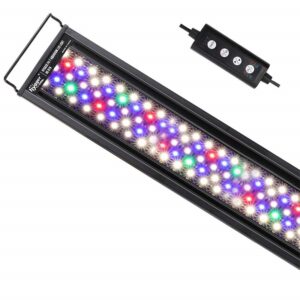
The hygger 978 aquarium light, with super-bright 6500K white LEDs and full-spectrum RGB LEDs, can emit bright light to brighten out the colors of fish and plants. It is suitable for fish-only tanks and planted tanks.
Appearance and Device
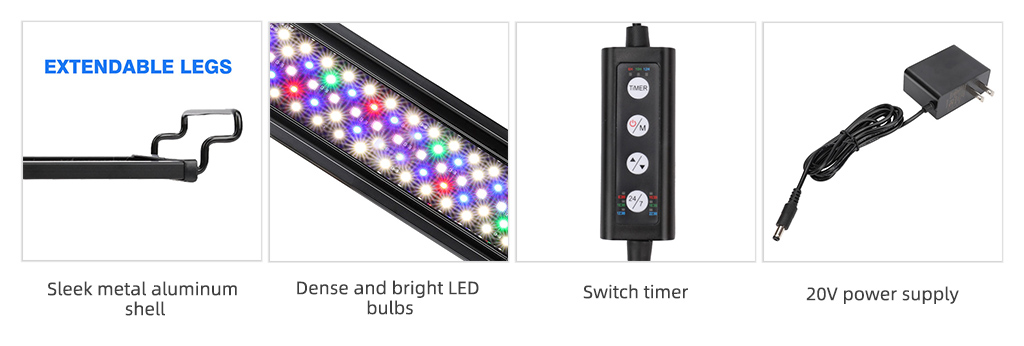
Sleek metal aluminum shell
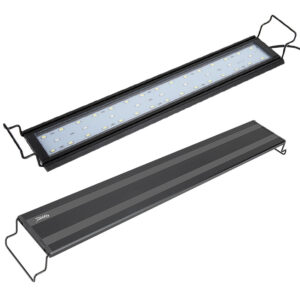
The sleek, black metal aluminum shell produces little heat so that it won’t raise the water temperature. The metal adjustable legs are suitable for more aquariums.
Dense and bright LED bulbs
Dense and bright LED bulbs provide optimal illumination for fish and plants to grow. Besides, you do not need to worry about splashes and other accidental drops of water, because it is coated with water-resistant material.
Easiest Tutorial of Aquarium Light
Switch timer
After your programming, the light will be auto-on and off without manual adjustment.
20V power supply
It is safe and suitable for 100V – 240V use. Besides, a DC-powered, low-voltage power supply could keep your energy bills down.
Functions
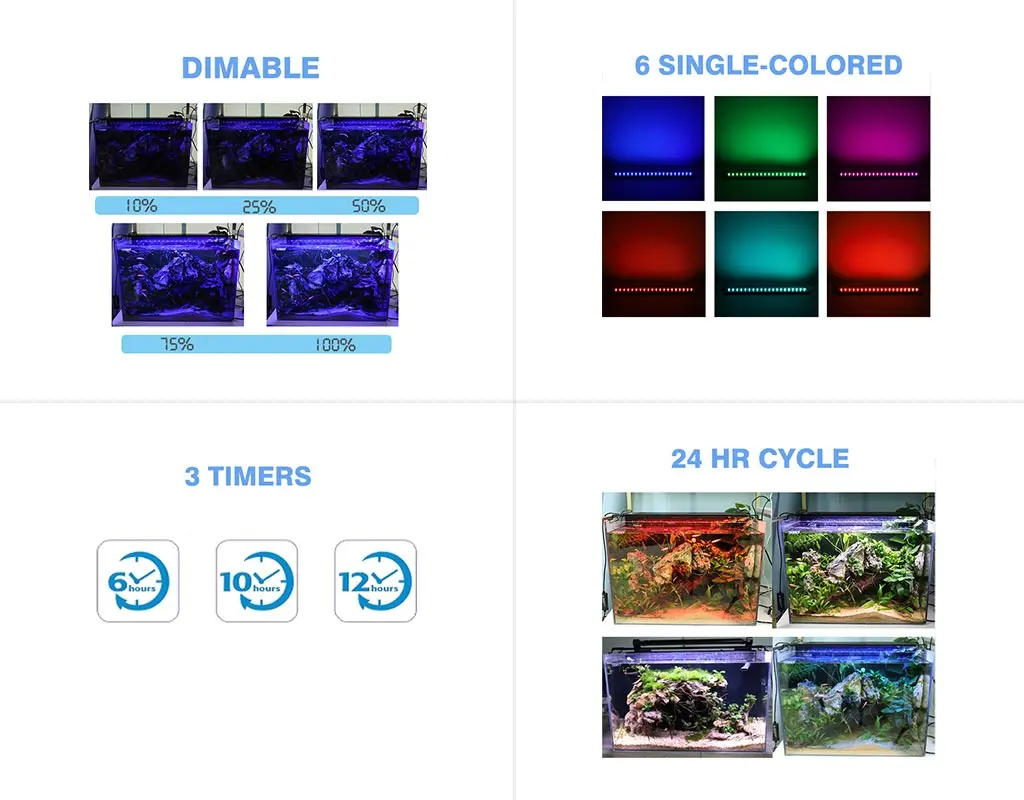
Dimmable
5 levels of intensity available: 10%, 25%, 50%, 75%, 100%
Multicolor
6 single-color available – red, blue, green, purple, cyan, orange, and plus full spectrum light
Timer
3 timers available – 6 hours/10 hours/ 12 hours
24 hours cycle
Once set, you do not need to manually turn on and off the light.
Programming Modes
DIY Mode
If you want to let your fantastic ideas be a reality, DIY mode may be your best choice. Or if you just want to select one color of light for a certain time, the DIY mode can also meet your needs.
24/7 Mode
If you only need the aquarium light auto on and off, the 24/7 mode is quite suitable for you.
In the 24/7 Mode, the light will start with warm orange light at sunrise, and at noon, it will turn into bright full spectrum light, and it will become starry blue light at nighttime. Finally, it will turn off automatically, and the fish and plants will have over 7 hours of sleeping time. The default light automatically turns on at 6:00 a.m. and turns off at 22:30 p.m., but it depends on the time section you choose. For example, in the time section, if you choose the ‘8:00’ option at 7:50 a.m., it will turn off at 22:20 that day. The next day, it will turn on at 5:50 a.m.
How to operate hygger 978 aquarium light
This part is the highlight of this article! We will cover detailed information about how to use the hygger light.
Just to be clear in advance, the relevant information about the hygger 978 aquarium light is as follows:
| hygger 978 Aquarium light | |
|
Model |
HG-978 18 IN |
|
Lumen |
1075 |
|
Power |
18W |
|
CRI |
85 |
| Power adapter | |
|
Input: 100-240V-0.5A 50/60Hz |
Output: 20V-600mA |
Besides, there are also some tips you should notice:
1. If you need to, you can long-press the second button to manually turn off the light.
2. Please keep the controller away from water as it is not waterproof.
3. Do not put the light underwater.
4. You need to reprogram the light if the power fails.
Next, let’s enjoy tutorial programming for two different modes.
DIY mode
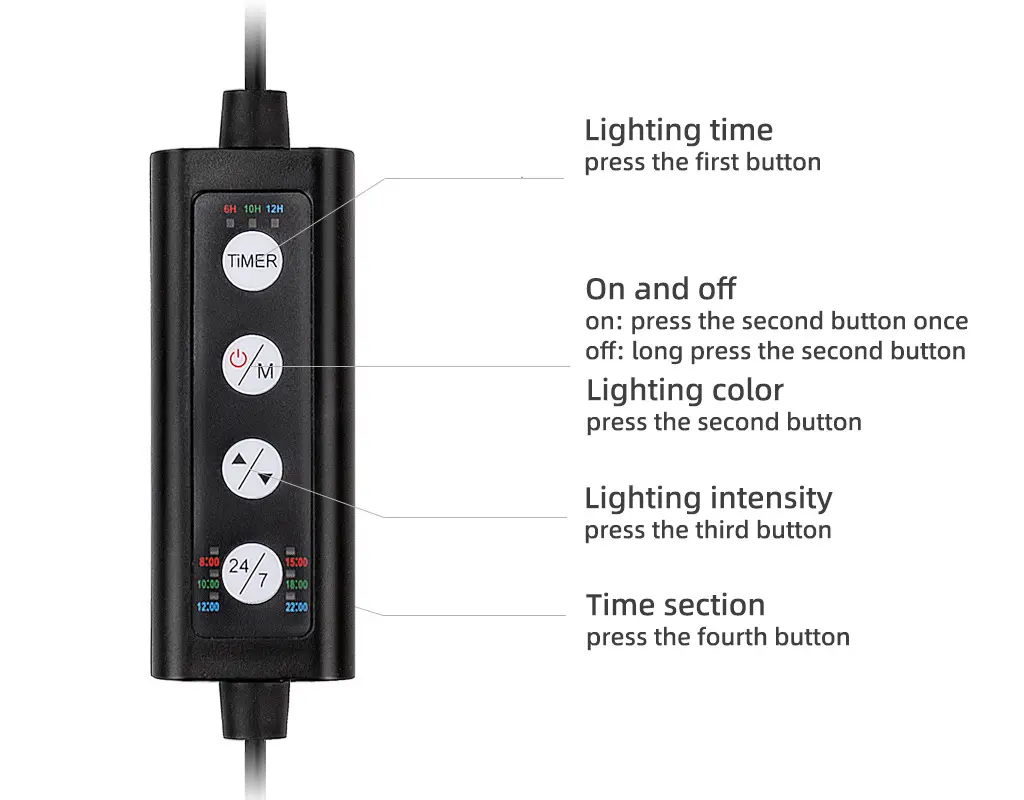
On and off
On: Press the second button once
OFF: Long press the second button for about 3 seconds
Lighting time
Press the first button to choose the lighting time. There are three lighting times available – 6 hours, 10 hours, and 12 hours. You can choose one of the lighting times, for example, if you choose the ’10’ hours when you set the light at 7:30 am local time, it will turn off at 5:30 pm. The same as you choose the ’12’ hours.
Lighting color
Press the second button once, if the lighting color still is not what you want, please press the second button again or more once again. And there are seven colors available – full spectrum and six single colors which are red, blue, green, purple, cyan, and orange.
Lighting intensity
Press the third button once, if the intensity still is not what you want, please press the third button again or more once again. There are five level options – 10%, 25%, 50%, 75%, 100%. And if the intensity level is 10% at the beginning, as you press the button again and again, it will change from 10%, 25%, 50% to 100%, and then go from 100% to 10%. That is to say, if you choose the intensity level of 100%, and press the third button again, the intensity level will become 75%.
After you set the DIY mode, the light will memorize all the lighting time, color, and intensity automatically and auto-loop them every day until you reset it (you can unplug the light and replug it to reset).
24/7 mode
On and off
On: Press the second button once
OFF: Long press the second button for about 3 seconds
Time section
Press the fourth button to choose the time section for the embedded mode. For example, if it is 7:51 a.m. now, you can choose the time section ‘8:00’, and the light will run the 8:00 embedded mode. It will auto change to other modes when time goes to 10:00 am, 12:00, 15:00, 20:00, and 22:00. Finally, the light will shut off at 22:30. It’s convenient for aquarists who need to choose the special turn-on mode and don’t need to DIY other functions.
However, there is one tip for you. If you choose 24/7 Mode, the lighting color, intensity and time are automatic, and the timer will not work, you just need to set the time section, which means you do not need to set anything but the time section you need.
Notice that if you choose the 24/7 mode, the light intensity is the built-in default intensity and can’t reset.
Conclusion
In summary, we have introduced pieces of information about the hgger 978 aquarium light, and we have also covered details about how to operate the light. After reading the article, we believe you have got the information you want, right? Any other questions, please leave your message to NEED HELP. We will try our best to help you out.
FAQs
Q: Is hygger 978 intended for use on aquariums containing plants that require Low, Medium, or High light levels?
A: The plants require low light needs 50-80 lumens/gallon, medium-light plants require 80-160 lumens/gallon, and the high-light plants’ requirement is 160-190 lumens/gallon.
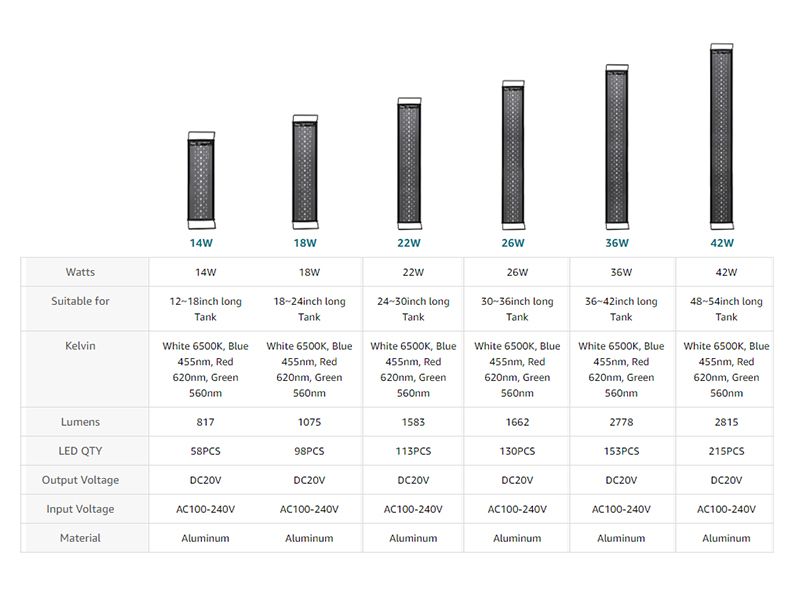
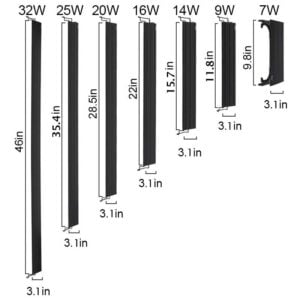
To take 10 gallons as an example, 978 light 14W, 18W, and 22W are suitable for plants needing medium light. As the light specifications show below, you can find suitable watts for various plants.
Q: What is the Lux measure of the light output for hygger 978 at 12″ and 24″?
A: Lux is a unit of luminance, the symbol is LX. It means when an object is illuminated by light uniformly, its luminous flux on one square meter is 1 lumen, then its luminance is 1 lux. So if you want to know the lux measure of the light, you can take a reference of the lumen parameter.
hygger 978 14W has metal brackets that can be extended to a 12″-18″ tank, so the lumen/lux is 817 at 12″, and the 18W light can be extended to an 18″-24″ tank, its lumen/lux is 1075 at 24″, and 22W is 1583, it can also be used for 24″ tank.
Related Products

I cannot get the 24/7 mode to set. Once I select the time the selection just continues to flash and never progresses
Sorry for the inconvenience caused to you.
To solve the issue more accurately, would you shoot a video about the timer setting and send it to [email protected]?
hygger customer service is waiting for you to solve the issue.
Thanks
Have only had the light a few months and it has stopped working all together.
Sorry for the inconvenience caused to you.
To solve the issue more accurately, would you shoot a video about the timer setting and send it to [email protected]?
hygger customer service is waiting for you to solve the issue.
Thanks
I recently purchased the hygger clip on 24/7 lighting aquarium led light and cannot figure out how to get the timer working. When I choose the 12 hr timer which is what I want, it just keeps flashing which from what I’ve read means it’s broken? If it is I will be very disappointed
Sorry for the inconvenience caused to you.
To solve the issue more accurately, would you shoot a video about the timer setting and send it to [email protected]?
hygger customer service is waiting for you to solve the issue.
Thanks
Hello, my Hygger light from Amazon, which does NOT contain a product model other 14w is malfunctioning in 24/7 mode. I set it at exactly 6am and it turns off at 8pm and turns back on at 4am. Please advise. I can’t paste the Amazon descriptor either and no longer have the box.
Sorry for the inconvenience caused to you.
Would you please shoot a video of the issue and send it to [email protected]?
The hygger customer service team is waiting to solve the issue more accurately for you there.
Thanks
I was so excited to get mine today and I’m getting the blinking too. 😔
When trying to set 24/7 mode the light just keeps flashing and I can’t figure out how to actually set it.
Hi Whitney Smilo,
Sorry for the inconvenience caused to you.
Please shoot a video and sent to [email protected]
hygger customer service is waiting to solve the issue for you.
Thanks
This is exactly what happens with my light, too! I select the appropriate time block and the light just flashes and flashes and the lighting never changes as different time blocks are entered. It is as if you are neglecting to tell us a step, like press another button to start the timer.
Hi Michael,
What the model of your light?
Please take a video of the issue and send it to [email protected].
Customer service will give you appropriate suggestions based on the issue of the heater.
Thanks for your patience
Your instructions make absolutely NO sense, and I have emailed with you on several occasions about this and yet STILL not working on FOUR of these lights!!!!!!!!!PLEASE, EXACTLY what steps and what buttons do I press, IN ORDER, for the default 24×7 mode? All I need is sunrise, daylight, sunset night time and then off for a few hours. I have 4 different emails from you which make absolutely NO sense whatsoever!!!!!!!
FOR EXAMPLE: your instructions read, in part, “……Press and hold 24/7 button, start will light up, a light will flash on 1:00 to 12:00” there is no START light!!!!!!!!!
AND, even when setting the local time, there is NO differentiation between am and pm!!!!!!! AGAIN, your instructions read, in part “Press and hold the setting button, a light will flash on 1:00 to 12:00, then press the +- button to adjust to sunrise time you want” EXCEPT if I set the unit up in the early evening and I want it to start at 8.00 AM there is not “clock” to tell the difference between 8:00 AM and 8:00 PM!!!! This thing is USELESS and as a computer programmer I am NOT stupid and sorry but I have better things to do than waste HOURS trying to set lights on FOUR aquariums where i wasted money by buying this light.
Hi Trevor Money,
Sorry for the inconvenience caused to you.
We have been improving the operating instructions of the lights. Thank you for your questions and suggestions.
If it is convenient, please take a video of you setting the light and send it to [email protected].
Customer service will give you appropriate setting suggestions based on the model of the light.
Thanks
I just bought the HG005-6w light and I cannot change the one color it started in I’ve read the instructions many times and watch videos about it I cannot get it too change please help.
Hi Cole,
Sorry for the inconvenience caused to you.
hygger customer service team will help to solve the issue in the light, please shoot a video and send it to [email protected].
Thanks
Im having a problem also with the 24 hour mode. Whenever i select the time the led light on the remote just keeps flashing. Is it supposed to keep flashing?
Hi Joshua,
It seems there is something wrong of the light, would you shoot a video and send it to [email protected]?
hygger customer service will reach out to you and help to solve the issue.
Thanks